
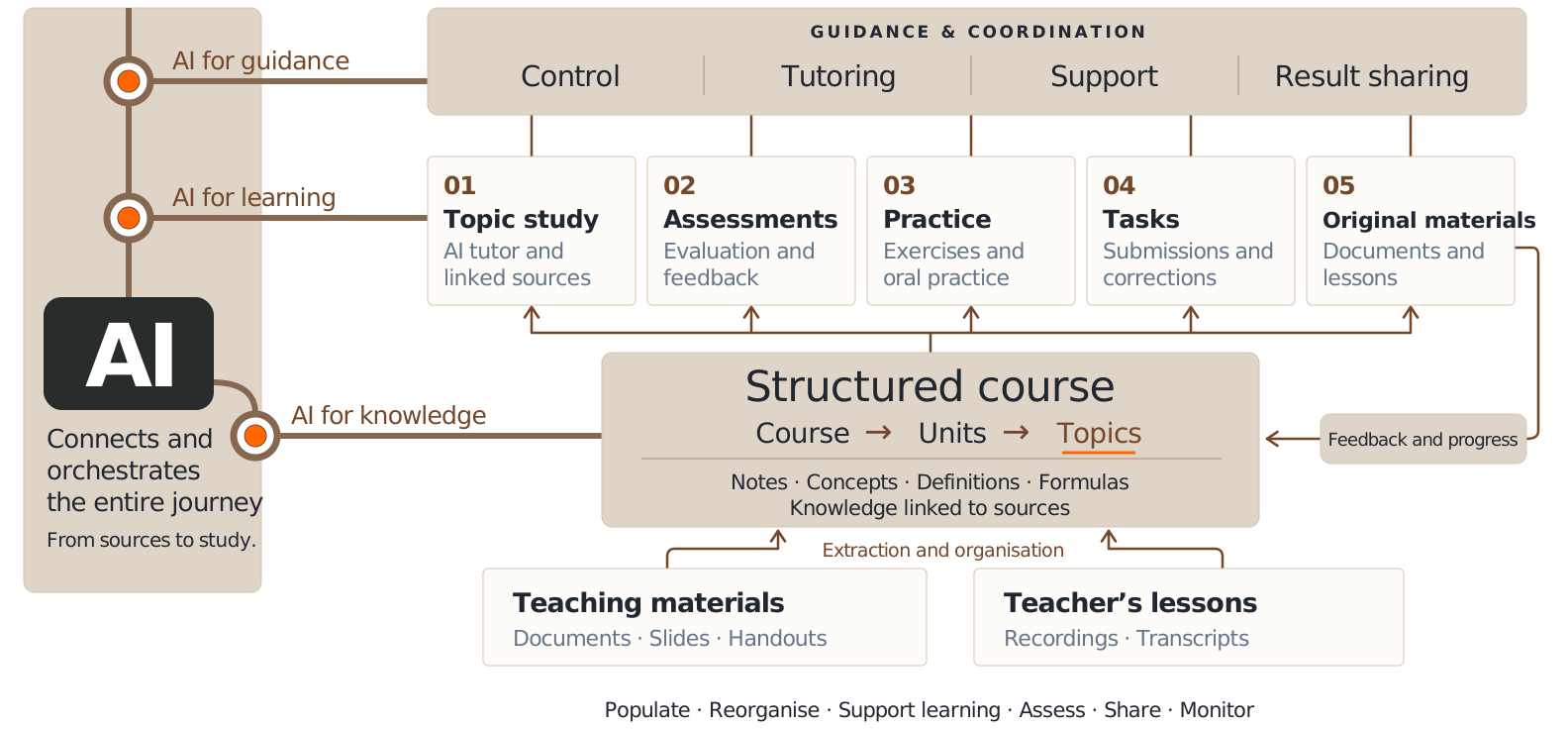
The connected learning workspace

From lessons to
measurable learning.

Promptus brings lessons, course knowledge, AI tutoring and practice together in one place. Students learn with guidance, classes progress together, and institutions coordinate support.

Teaching materials and recorded lessons feed a structured course. AI orchestrates course knowledge, learning activities and a guidance layer for control, tutoring, support and result sharing. The teacher reviews content and guides learning.
AI connects course knowledge, learning activities, guidance and result sharing. View full size (opens in a new tab)

From the lesson to shared knowledge

Lesson knowledge.
Ready for the class.

Promptus turns lessons and materials into shared knowledge for the class, saving the teacher time and effort.

Start with the lesson
Bring the lesson recording, documents and materials together.
Your structure. Automatically organised.
Lesson knowledge is reorganised into courses, units and topics defined by the teacher or institution.
Ready for the class
Make notes, definitions and formulas available for study, AI tutoring and practice without rebuilding the lesson by hand.
Inside Promptus: lesson knowledge, organised for study. Click to explore.

Course content · Lesson notes, definitions and formulas

A Promptus lesson showing notes, definitions and formulas connected to its course.

Application screenshot with illustrative data.

Guidance throughout the journey

An AI tutor that
knows your course.

Ask a question, work through an example or revisit a difficult concept. The tutor uses your lessons and course knowledge to connect explanations with the sources you are studying.

AI supports the whole class.
The teacher reviews content and guides learning.

Inside Promptus: an explanation linked to its lesson. Click to explore.

AI tutor · A course-based explanation with linked sources

The Promptus AI tutor explaining the chain rule with a link to the relevant lesson.

Application screenshot with illustrative data.

  1. 01

    Plan

    Choose a study focus. Prepare lessons and activities around your course topics.

  2. 02

    Learn

    Get explanations, ask follow-up questions and practise with guidance.

  3. 03

    Verify

    Review answers and feedback. Use mistakes and progress to decide what comes next.

For the whole learning community

For every
learning context.

See Promptus in practice

Student

Study with a clear direction

Your personal study space connects course materials, explanations and practice. Move from a question to a clearer understanding, then decide what to revise next.

For personal learning
Your course, in one place
Find the syllabus, lessons, materials, notes, definitions and formulas organised by topic.
Answers grounded in your lessons
Ask the AI tutor for explanations and examples, with links to the course sources to explore further.
Voice study and oral practice
Discuss a topic aloud or practise answering oral questions. Continue in writing in the same conversation.
Practice with feedback
Complete exercises, review the assessment of your answers and understand which steps need more work.
Revision that starts with mistakes
Revisit recorded mistakes and your practice history to focus on topics that need reinforcement.

Class

A class, guided by its teacher

Connect what happens in the lesson with what students study and practise. The teacher prepares and reviews shared content, assigns activities and follows the class’s progress.

For your class
A course shaped around your teaching
Organise units and topics, and connect knowledge extracted from lessons to the syllabus you define.
From lessons to shared materials
Bring recordings and documents together, review the resulting notes and publish lessons for the class.
Activities, submissions and corrections
Create exercise-based assignments and review students’ submissions and the feedback on their work.
Individual support, shared context
Each student can ask the tutor questions and practise using the same course knowledge as the class.
Progress that informs teaching
Review participation, practice and accuracy to identify recurring difficulties and choose what to revisit.

Institution

Coordinate the whole learning environment

For schools and universities that need a shared view across courses and classes. Coordinate people, follow learning indicators and work with teachers to organise timely support.

For schools and universities
Courses, people and enrolments
Register students and teachers, create courses, assign teachers and manage enrolments by academic year.
A connected view of the organisation
Explore relationships between teachers, courses and students through the learning network, with search and filters.
Reports across courses and periods
Compare participation, completed practice and accuracy in 7- or 28-day reports, with course filters and CSV export.
Evidence for timely support
Use recurring difficulties and trends to discuss targeted support with teachers, then review progress over time.
Roles, permissions and identity
Define access and responsibilities, customise the workspace’s visual identity and configure AI models and usage limits.

Learning indicators inform decisions. Educational judgement stays with people.

Use cases

How will you use Promptus?

From personal study to a shared teaching approach: explore concrete ways to bring Promptus into your learning environment.

For students

Keep up with university courses

Bring lessons, notes and course materials together. Ask the tutor to clarify difficult concepts and use practice and feedback to prepare for exams.

Prepare for a competitive examination

Organise study around the examination syllabus and reference materials. Practise topic by topic, review mistakes and focus revision on the gaps that emerge.

Learn through a specialisation course

Follow a structured path using course sources and materials reviewed by the teacher. Check your understanding with exercises and feedback, and track what you still need to consolidate.

For teachers and university lecturers

Guide a class on reviewed materials

Share course content reviewed by the teacher, giving everyone the same reference sources. Follow participation, practice and difficulties as students work, and use that evidence to guide the next lesson.

Prepare better university teaching materials

Turn recordings and documents into organised notes, definitions and formulas. Spend less time assembling materials and more time reviewing, enriching and sharing high-quality content with students.

Design teaching you can verify

Connect learning objectives with activities, exercises and feedback. Use progress and recurring mistakes to identify gaps early, adapt teaching and check whether support is helping.

For schools and institutions

Build consistency across courses

Define a shared teaching structure and reference materials across courses, while leaving teachers room to shape their lessons. Give students a coherent learning experience.

Keep a current view of learning

Use course indicators and reports to keep track of participation, practice and accuracy. Help teachers and coordinators recognise recurring difficulties and decide where to intervene.

Keep families informed

Use learning reports as a basis for teacher-led conversations with families. Share concrete progress, areas to strengthen and the next steps agreed to support each student.

Coordinate timely tutoring

Identify students and topics that need attention, then coordinate targeted tutoring with teachers. Review subsequent practice and feedback to understand how learning is progressing.

Grow an institutional knowledge repository

Build up reviewed lessons, sources and teaching materials over time. Preserve the institution’s knowledge, support teacher handovers and make it easier to prepare high-quality courses year after year.

Student · Class · Institution

Find your place in Promptus.

Explore licences

Application screenshots use illustrative data.

Institution / Contact us

Let’s talk about
your institution.

Tell us about your courses, people and learning environment.

support@promtus-ai.com

Prepare your enquiry, then send it from your email app.